Where each setting lives: the FOV slider and the config workaround past 90, the new health bars, and the keybinds players change most.
Deadlock How to Change FOV, Health Bar and Keybinds
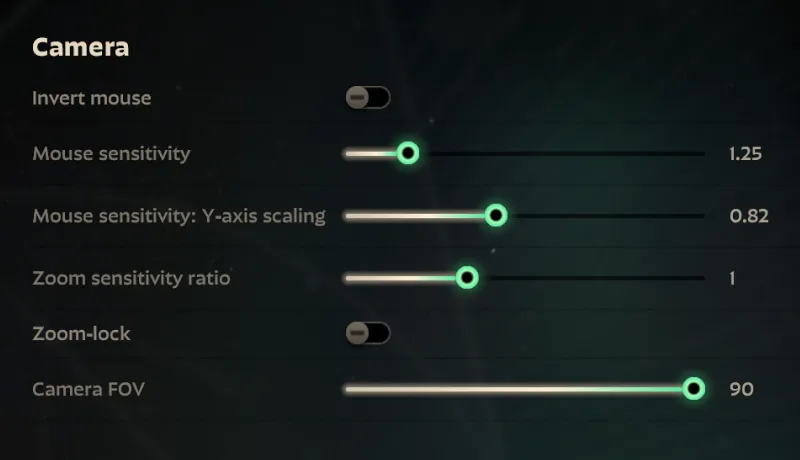
To change FOV in Deadlock, open the settings menu and drag the Camera FOV slider in the Camera section - it stops at 90, and going wider means editing the gameinfo.gi config file, a community workaround Valve has never endorsed. The redesigned health bars and every keybind players reassign live in the same settings menu, and most of the new HUD pieces can be switched off there too.
- FOV: Settings, Camera section, Camera FOV slider, hard cap at 90.
- Past 90: add
"r_aspectratio"underConVarsingameinfo.gi- community method, reports of it breaking after patches. - Health bars: rebuilt by the City Never Sleeps update, with health numbers and damage options in Settings.
- Keybinds: Abilities, Items and Hero-specific pages, plus a Keybind Map that shows what is still free.
Official source: City Never Sleeps - Deadlock official update page - Valve's own list of the new health bars, the keybind tools and the health and damage options.
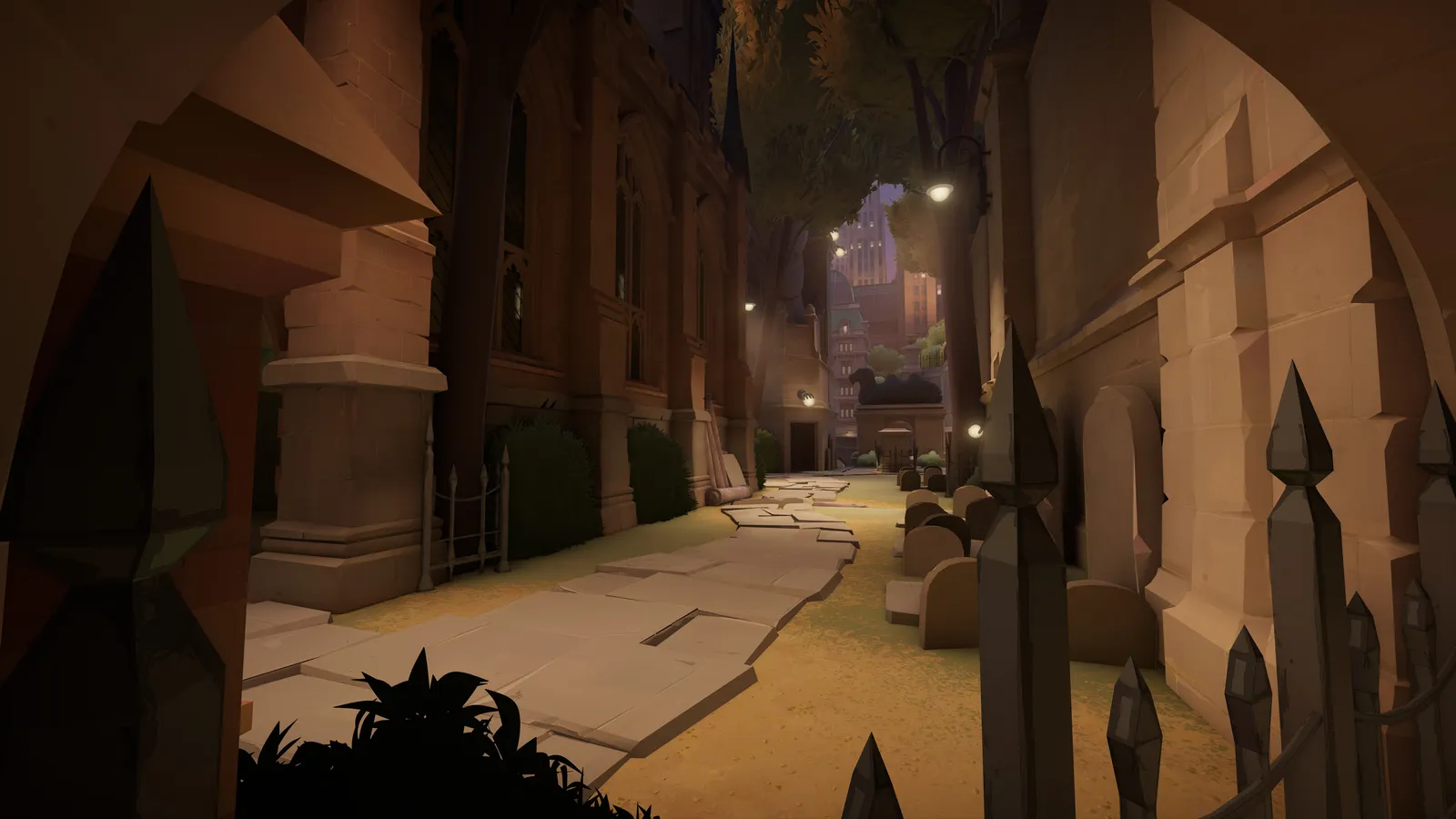
The Camera FOV slider stops at 90
Open Settings and find the Camera section. It holds Invert mouse, Mouse sensitivity, Mouse sensitivity: Y-axis scaling, Zoom sensitivity ratio, Zoom-lock, and at the bottom Camera FOV. Drag that slider to the right end and you are looking at 90 - that is the ceiling, not your current value.
Ninety is what the people who write settings guides actually run. Dexerto's July 15, 2026 walkthrough runs Camera FOV maxed at 90 and calls it non-negotiable - the extra peripheral information catches flanks and rotations a beat earlier (Dexerto settings walkthrough).
The cap is also the most requested change on the official forum. A March 27, 2026 thread asks Valve to raise the option to 120: "Please increase the amount of FOV we can use so we never touch the ConVars again. 90 is WAY TOO LOW for me." A reply in the same thread reports severe headaches below 103 FOV, and another player logged in just to ask for a 105 to 115 range (Increase FOV option to 120). As of this writing Valve has not moved the slider.
Going past 90: the gameinfo.gi workaround
The only method the community has used for years is a config file edit. It works like this:
- Steam Library, right-click Deadlock, Manage, Browse local files.
- Open the
gamefolder, thencitadel, thengameinfo.gi. - Open it with Notepad, hit Ctrl+F and search for
convars. - Inside the
ConVars { }block, add a line such as"r_aspectratio" "2.83"- the value and its quotes both matter. - Save, relaunch, and confirm in the Camera section.
r_aspectratio values are mapped to degrees by players, not by Valve: 2.15 equals 90 FOV, 2.49 equals 100, 2.66 equals 105, 2.83 equals 110 and 3.00 equals 115 (Beyond 90 FOV video). One of the most-cited confirmations is a player on the official forum who posted their own gameinfo.gi ConVars block with "r_aspectratio" "3.0" in place, on Windows 11, game version #6,416, saying the 3.0 value "functions just like has worked always on my end" (the same forum thread linked above).
How long that lasts is unclear: check after every patch. Comments under the popular Steam FOV guide contradict each other through 2026 - "not patched, still usable" on April 28, April 29, May 5 and July 31, versus "patched, we need a new method" on April 10 and April 5. Players in that forum thread also worried that a modified gameinfo.gi would stop them from launching a match, until one reply noted the server-side requirement had not been pushed yet - "it's just a matter of time before they make it a requirement."
Back up gameinfo.gi before touching it, and keep the original in a safe place - a patch can rewrite the file and silently revert your value. Valve has published no statement allowing or banning this edit, and City Never Sleeps shipped with "Improved anti-cheat" in its official notes. If the game starts refusing the file, the backup is your restore path. The slider at 90 is the only FOV number Valve actually supports.
The new health bars and what each piece means
The City Never Sleeps update of September 29, 2026 rebuilt every hero health bar in the game, and the old alternate health bar trick is gone - these are now the default. Valve's own page lists what landed: player names, a Rejuvenator indicator, an ultimate indicator, current health value that drops in real time as you deal damage, stamina tracking, critical health status, haunt soul values, objective tankiness, and damage number options.
Official source: City Never Sleeps patch notes - HUD and settings sections
Reading the bar in a fight breaks down like this:
| Piece on the bar | What it tells you |
|---|---|
| Ultimate eye | Eye open means the enemy ultimate is ready, eye closed means it is on cooldown - allies and enemies both |
| Stamina chevrons | Bars above the health bar; for enemies they show for a few seconds after a dodge while in vision, for allies much longer |
| Current HP number | Appears in the corner as you damage them; the ally version is off by default |
| Player name | Above the bar for both teams; Streamer Mode swaps in hero names instead |
| Critical / Assassinate | "Critical" sits under a low-health enemy; Vindicta's Assassinate bonus (under 50% HP) and Shiv's execute marker take priority |
| Rejuvenator icon | Top-right corner when that hero still has a Rejuvenator use available |
Shields render light blue and incoming healing green on every bar, enemy status effects appear above their bar while your own sit under the reticle, and the new haunts and turrets got the modernized bars too - so a camp's soul value and difficulty are readable before you commit to it (esports.gg health bar breakdown).
Valve was not finished on launch day: the first follow-up patch reduced the brightness of player names on health bars, shrank the ultimate indicator, and improved the stability of health bar position - three concessions to how noisy the first version read.
The health bar options you can switch off
Everything above is configurable in the settings menu. Under the health and damage options you choose whether health bars display health numbers at all, whether allied heroes show health numbers when they take damage, and how cumulative damage totals are displayed - Valve lists these as dedicated settings with individual reset buttons, and marks any setting you have changed from its default (official update page). The esports.gg breakdown adds the practical rule: many of the new elements can be toggled off in-game if you do not want to see them.
If the bar itself reads wrong rather than cluttered - stutter when it updates, frames collapsing when a fight starts - that is a rendering problem, not a settings choice, and the fix list is on our performance settings page. The full HUD and map rework is covered in the City Never Sleeps breakdown.
The keybinds players change most
Deadlock's keybind settings are split into pages for Abilities, Items and Hero-specific actions, and the cast settings sit next to them. Dexerto's July 2026 template stays close to the defaults with two named departures - push-to-talk on V "as that is what most are used to", and Item 4 moved to E for easier access - and the wider pattern of changes looks like this:
| What players rebind | Typical setting | Why |
|---|---|---|
| Push-to-talk | V | Matches what shooter players already know |
| Item slot 4 | E | Inside the WASD hand's reach instead of a stretch |
| Hero abilities | Mouse buttons, e.g. Apollo's Ability 3 on right click | Mobility and targeting binds off the keyboard |
| Casting mode | Quick Cast | Fires on key press instead of a second confirm click |
| Alternate cast | Press and Hold, hold time 0.15 | Self-casts and ally saves become one held button |
| Active items | Instant Cast | Hover a target and see Rescue Beam or Knockdown land before committing |
Hero-specific rows are the ones people actually touch late: Bebop's sticky bomb and Rem's Tag Along set to Instant Cast so the range shows live, Apollo's free-movement ability moved to right click (Dexerto keybind tables).
Since City Never Sleeps, rebinding got three tools Valve added directly: a Keybind Map that shows every key and mouse button you have bound, which ones are free and what each does; Bind By Key, where you click an empty key and assign a command to it; and scroll wheel binds for actions that previously only accepted a button press. Also new: previously non-bindable actions (including Avoid Hero for mice without a middle button), per-hero settings behind TAB in the Settings menu, and shareable codes that copy your reticle and keybinds as text a friend can apply.
Settings also flag anything changed from its default, and they are cloud-saved, so a new machine does not mean a fresh key layout.
The binds worth setting first if you are coming in fresh are dash, jump and slide - they carry every movement technique on our movement guide. Controller players have a different problem entirely; the current state of official controller support is on the console page.
FAQ
Can you change FOV in Deadlock settings?
Yes. The Camera section has a Camera FOV slider, and 90 is its maximum. Anything wider comes from the gameinfo.gi config edit, not from the menu.
Is it safe to edit gameinfo.gi for a higher FOV? No official answer exists. It is a community workaround with contradictory patched and not-patched reports through 2026, Valve endorses nothing, and anti-cheat was improved in the September 2026 update. Back up the file, expect the edit to vanish when a patch rewrites it, and treat anything past 90 as unsupported.
Why do the health bars look different? City Never Sleeps, on September 29, 2026, normalized every bar in the game and added ultimate status, stamina, names, live health numbers and critical markers. Health numbers, ally numbers and damage displays are all toggleable in the health and damage options.
Which keybinds should I change first? Push-to-talk, a reachable item slot, and any hero ability you fumble under pressure - then use the Keybind Map to see what is still free. Casting mode (Quick Cast) and active item casting (Instant Cast) change how fights feel more than any single key does.
Did my keybinds break after an update? Open the keybind settings page first, reassign anything the game lost, and check for double-bound keys before assuming a file is corrupt - post-patch keybind trouble is a recurring report.
Related Guides
- Deadlock Performance Settings for Low FPS Fixes - the other page about what Deadlock's settings menu actually controls.
- Deadlock City Never Sleeps Update: Full Breakdown - where the new health bars, HUD work and settings tools came from.
- Deadlock Movement Guide: Dash, Slide and Mantle - the dash, jump and slide mechanics your new keybinds have to serve.
- Deadlock Beginners Guide: Your First Three Matches - set FOV and binds once, then go play.
More Deadlock Guides
Destroy Guardians, then Walkers, expose the Patron, and burn it down. Why the Archmother pit punishes grouped pokes.
What to actually do in your first three Deadlock matches: secure orbs in the first ten minutes, buy the cheap item, learn the heavy melee timing.
Valve's Sept 29, 2026 major patch: rebuilt map and four new districts, Haunts replacing neutral camps, The Broker, six voted heroes, HUD and QoL work.
The Broker ran Sept 29 to Oct 2, 2026 and is gone with Rat King's release. What Corrupted items were, what they did, and what to do now.
Startup crashes, random freezes mid-wave, black screens and the access-violation crash - an ordered fix list, cheapest step first.
Haunts replaced neutral camps in the Sept 29 patch. Nine families across roughly 40 camps, three tiers, and the in-game respawn timer added this update.
How many heroes Deadlock has right now, who the 2026 vote rounds added, and how to pick a role instead of memorising a tier chart.
How the Deadlock shop works: slot counts, the Weapon, Vitality and Spirit categories, tier names and filters - what Valve publishes and what it never has.