
How the Deadlock Item Builder works, how to design a custom Weapon, Vitality or Spirit item, export the card, and what it cannot do.
Deadlock Item Builder: How to Design a Custom Item
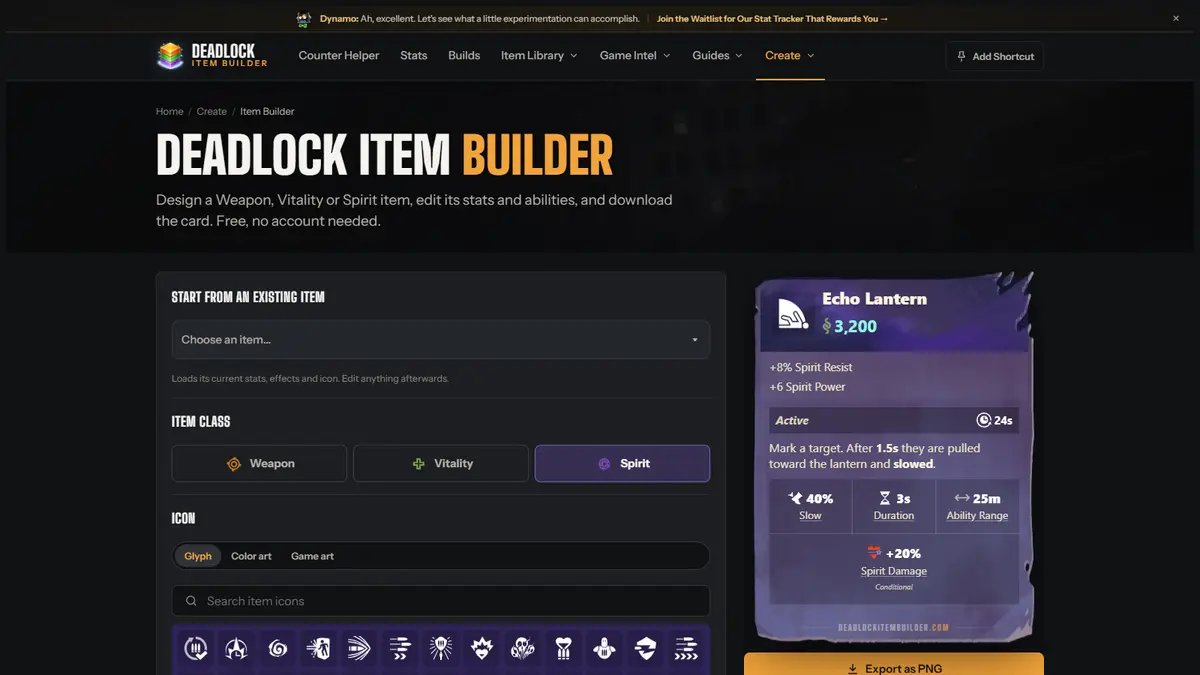
The Deadlock Item Builder is a free fan-made web app for designing item concepts, not a tool that puts new items into the game. You choose Weapon, Vitality or Spirit, set a soul cost and stats, write an ability, then export the finished card as a PNG or share it by link. It takes about two minutes to learn and no account is required.
That distinction matters because the name sounds like an in-game editor. It is not. The builder at deadlockitembuilder.com/item-builder has no connection to Valve, cannot import anything into Deadlock, and cannot change a real match. What it does well is make a rough idea look like a real item card so other players can judge it at a glance.
What the Item Builder actually does
The tool produces a concept card. You control the class, icon, name, cost, stats, ability text, cooldown, conditional notes and upgrade links. The preview updates as you type, and the export is a clean image that carries the site's watermark.
It is aimed at three groups:
- Theorycrafters who want to explain an item idea without typing a wall of text.
- Content creators who need a readable card for a video thumbnail or community post.
- Players writing feedback who want to show Valve or the community how a rework could look.
It is not a build planner. A build planner arranges existing items into a purchase order for a hero. The Item Builder invents a new item that does not exist. For actual builds, use the Deadlock builds guide and the in-game build browser.
How to design an item, step by step
1. Pick the item class
The class buttons at the top set the card's colour and frame: Weapon is orange, Vitality is green, Spirit is purple. Switching class keeps the work you have already entered, so you can test whether an idea reads better in another slot.
Class is not cosmetic. It tells the reader which shop category the item would sit in and which heroes would consider it. A Spirit item with Weapon stats looks wrong even before anyone reads the numbers.
2. Choose an icon
You can search the built-in game item icons or upload your own image. The upload accepts PNG, JPG and WebP up to 5MB. The icon is cropped into the card's art window, so use a square or near-square image with the subject centred.
The built-in icons are the safer choice for a serious proposal: they already match Deadlock's visual language, and readers recognise them. A custom upload is better for a joke item or a thumbnail.
3. Set the name and soul cost
The name and cost sit at the top of the card. Keep the name short enough to read at thumbnail size. Two or three words works best.
Cost deserves more thought than the name. A 3,200-soul item is a late-game purchase and readers will expect late-game stats. A 500-soul item is an early pickup and should not warp a lane. The builder does not validate balance, so the number you type is the number readers will argue about.
4. Add the base stats
Each stat row has a value, and the editor supports an optional "before" value. The before/after layout is useful for rework proposals: show the live item's current number on the left and your proposed number on the right.
The card supports the usual Deadlock stat vocabulary, including weapon damage, fire rate, bullet resist, spirit power, cooldown reduction and movement speed. Use the same stat names the game uses. Invented terminology makes the card harder to evaluate.
Real Deadlock items tend to have one defining stat and one or two supporting stats. A card with eight rows reads as a wish list, not a design.
5. Write the ability
Choose Passive or Active, then fill in the description. Active abilities get a cooldown field; the card displays it in the top-right of the ability block, the same place the game puts it.
The editor supports bold text, stat icons and a "conditional" flag. Use the conditional flag when the effect only applies in a specific situation, such as "while below 50% health" or "on the first hit after reload". That flag is the difference between a clear proposal and a card that promises a permanent buff.
6. Connect upgrades
The upgrade fields let you name the item this concept builds from or into. This is what turns a standalone card into a shop path. If your item is meant to sit between two existing items, fill both sides so the reader can see where it fits.
You do not need to fill the upgrade fields. A standalone item is a valid concept. But an upgrade path makes the proposal much easier to judge against Deadlock's actual shop structure, which the items explained guide covers in detail.
7. Export and share
The Export as PNG button downloads the card. The share button copies a link that rebuilds the same card in the browser. The PNG is the format to use on Discord, Reddit or a video thumbnail; the link is the format to use when you want someone to inspect or edit the design.
Exported cards include the Deadlock Item Builder watermark. There is no paid removal and no official endorsement implied by the mark.
What the tool cannot do
Be clear about the limits before you post a card:
| Limitation | What it means |
|---|---|
| No game import | The item exists only as an image and a web link. |
| No mod support | It does not patch Deadlock or create a playable item. |
| No balance check | Nothing stops you from typing a 200-soul item with 500 damage. |
| No account or cloud library | The share link is the save file; keep it somewhere safe. |
| No Valve affiliation | The tool is a fan project, not an official editor. |
The last point is the one that causes arguments. A polished card can look official. It is not. If you post one, label it as a concept.
Item Builder vs a build planner
These are different jobs, and using the wrong one wastes time.
| Tool type | Input | Output | Use it when |
|---|---|---|---|
| Item Builder | A new item idea | A concept card image and link | You want to propose or illustrate an item |
| Build planner | Existing items | A purchase order for a hero | You want a playable build |
| In-game build browser | Existing items and community builds | A build you can equip | You want to queue with it |
The item tier list is the right reference for judging existing items. The Item Builder is for items that do not exist yet.
Practical design tips
- Start from an existing item. The dropdown loads a real item's stats and icon, which gives you a sane baseline. Change one thing at a time.
- Match the cost curve. Compare your stat line with an item at the same soul cost before you export.
- Write the ability in plain language. "Deals damage" is not a design. "Deals 80 spirit damage over 3 seconds to enemies in a 6m radius" is.
- Use the conditional flag honestly. If the effect is always on, do not mark it conditional.
- Check the card at phone size. Most people will see it in a feed, not on a desktop monitor.
- Credit the tool. The watermark does that automatically, but a line in your post helps.
Is the Item Builder official?
No. The site is a fan project and is not affiliated with Valve. Valve has not endorsed it, and nothing in Deadlock's client links to it. That does not make it unsafe, but it does mean the cards are community content, not patch previews.
Valve's official communication channels remain the Deadlock Steam page and the official forum. Treat any item card, even a polished one, as a proposal until it appears in patch notes.
FAQ
Is the Deadlock Item Builder free?
Yes. The editor is free to use, requires no account, and does not charge for exports. The card carries a watermark.
Can I import a custom item into Deadlock?
No. The tool creates an image and a share link. It does not modify game files, and Deadlock has no custom-item system.
Can I use the exported card in a video or article?
Yes, that is what the export is for. Keep the watermark intact and label the item as a concept so viewers do not mistake it for a real patch item.
Does the builder save my work?
The share link preserves the card's values. There is no account library, so keep the link or the PNG if you want to return to the design.
Can I make a hero ability instead of an item?
Yes. The same site has a separate Hero Ability Maker for ability concepts. The workflow is similar: pick a hero, define the ability, export a card.
Why does my card look different from the in-game item?
The builder is an approximation, not a render of the game's UI. Fonts, spacing and icon crops can differ. The information is the point, not pixel-perfect mimicry.
Sources
- Deadlock Item Builder - the editor described above, fetched 11 November 2026
- Deadlock Hero Ability Maker - the related ability concept tool
- Deadlock on Steam - official store page and playtest status
Community source: the Item Builder is a fan-run tool with no Valve affiliation; its feature description comes from the site itself, not from an official Deadlock announcement.
More Deadlock Guides
Valve's Sept 29, 2026 major patch: rebuilt map and four new districts, Haunts replacing neutral camps, The Broker, six voted heroes, HUD and QoL work.
Deadlock has no redeem codes, no key field and no hero unlock codes. Here is what people mistake for codes, what actually grants access, and what to avoid.
What the connecting to network message means in Deadlock, how to check whether servers are down, and the local fixes worth trying in order.
The Broker ran Sept 29 to Oct 2, 2026 and is gone with Rat King's release. What Corrupted items were, what they did, and what to do now.
Startup crashes, random freezes mid-wave, black screens and the access-violation crash - an ordered fix list, cheapest step first.
Deadlock's Halloween 2026 event runs through November 2: break cauldrons with a Heavy Melee for Candy and Sugar Rush, and the Oct 31 balance patch.
Haunts replaced neutral camps in the Sept 29 patch. Nine families across roughly 40 camps, three tiers, and the in-game respawn timer added this update.
How many heroes Deadlock has right now, who the 2026 vote rounds added, and how to pick a role instead of memorising a tier chart.